T Minus Timelines for Marketers: 6 Week Sprints, Gates, and RACI


A campaign production timeline maps every production phase to calendar dates, working backward from launch day. Use a 6-week T-minus sprint for tactical paid bursts, a 3-month runway for creative-led campaigns, and 6 months or more for partnerships and sponsored launches. Success looks like a locked brief, a frozen asset list, and completed launch QA before anyone touches the publish button.
TL;DR:
A 6-week sprint is suitable for tactical campaigns with a known concept, with the offer, audience, and messaging locked by week 6.
Three main timelines are recommended: six weeks for quick campaigns, three months for creative development and testing, and six months or more for partnerships and legal reviews.
Using a spreadsheet for scheduling works up to about 50 active tasks; beyond that, dedicated project tools with real-time collaboration are necessary.
Building backward from the launch date ensures schedule stability, with key steps including locking the launch date, creating a detailed briefing pack, and mapping dependencies.
Clear approval gates with fixed criteria and strict revision limits help prevent last-minute delays and ensure on-time delivery.
Table of Contents
Choosing the Right Campaign Production Timeline
The runway you choose should match the complexity of the work, not the urgency someone feels about the calendar. Three cadences cover most of what marketing teams actually produce, and each one locks different decisions at different points.
The 6-week T-minus sprint works for tactical paid bursts, seasonal promotions, and single-channel pushes where the creative concept is already known. At T-6, you lock the offer, the audience, the core message, and tracking setup. Weeks T-5 and T-4 handle creative development and first-round feedback. T-3 is production. T-2 is QA and trafficking. T-1 is the final rehearsal and buffer. This structure, with named weekly deliverables and a frozen briefing pack, is what makes launches ship on time instead of sliding into the week they’re supposed to go live.
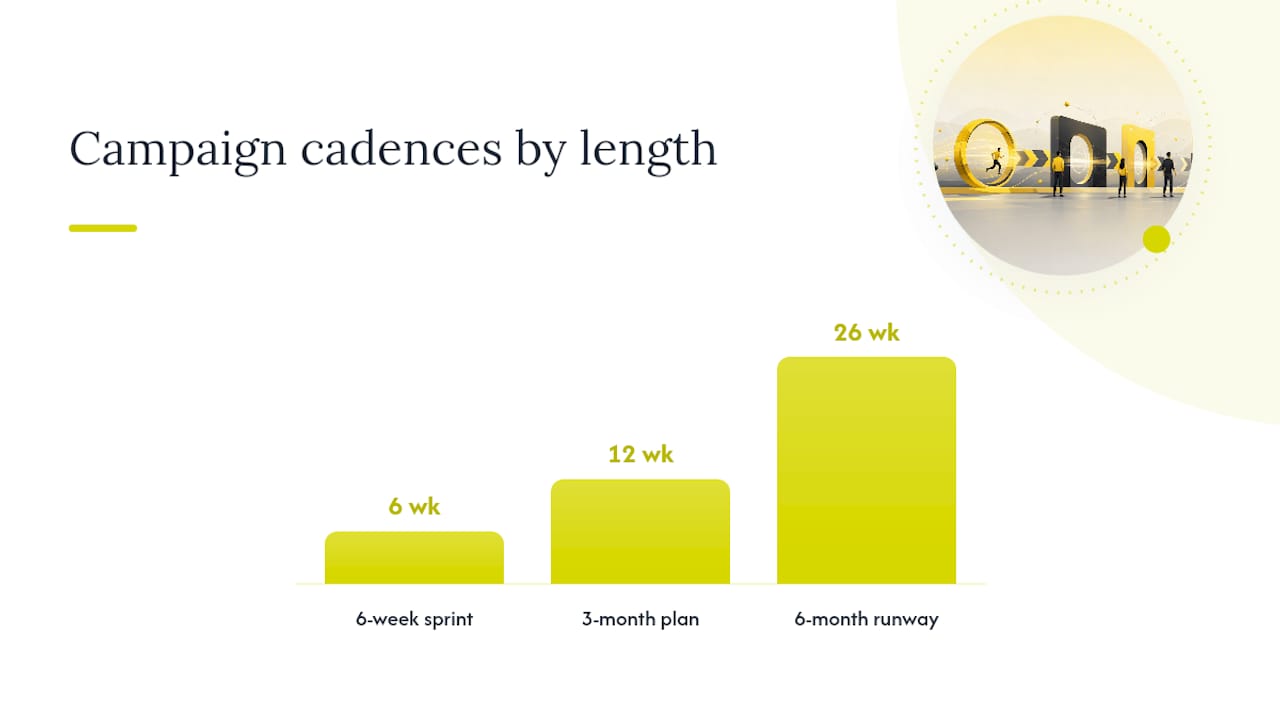
The 3-month plan gives you room for actual testing, premium media negotiation, and partner coordination that a 6-week sprint can’t absorb. Month one is strategy and briefing. Month two is creative production with built-in revision rounds. Month three is media buying, QA, and staged rollout.
The 6-month-plus runway is necessary the moment talent contracts, sponsorships, or multi-brand partnerships enter the picture, because legal review, talent scheduling, and co-branding approvals simply take longer than any production task itself.
Quick reference by campaign type:
Flash sale or promo push: 6-week sprint
Brand campaign with new creative territory: 3 months
Influencer or celebrity partnership: 6 months minimum
Co-branded product launch: 6 months minimum
Always-on paid social refresh: 6-week rolling cadence
Which Timeline Format Should You Use?
The format matters less than whether every contributor can see dependencies and freeze dates at a glance. Three formats cover almost every team’s needs.
A Gantt chart earns its complexity when tasks depend on each other. If creative can’t start until strategy is approved, and media buying can’t start until creative is locked, a Gantt view shows the chain visually and flags what a delay upstream does to everything downstream. A production timeline’s real job is mapping phases, durations, dependencies, and resource assignments onto a single calendar view, which is exactly what a Gantt structure is built for.
A calendar format fits editorial and content-heavy campaigns better, where the main question is “what publishes when” rather than “what blocks what.”
A spreadsheet is the right starting point for almost everyone, and there’s no shame in it. Every template needs four fields at minimum: owner, duration, dependency, and freeze date. Skip any of those four and someone will miss a handoff.
Owner: who is accountable, not just involved
Duration: realistic days, not optimistic ones
Dependency: what must finish first
Freeze date: the point past which changes require escalation
Pro Tip: Add a fifth column for “confidence level” on each task duration. A task marked “low confidence” is your early warning system for where buffer time needs to go.
Spreadsheets stop working once you’re juggling more than about 50 active work orders, multiple editors changing the same file simultaneously, or you can’t answer a quick “what if this slips two days” question without rebuilding half the sheet. Those three warning signs mean it’s time to move to dedicated scheduling software or a project management platform with real-time collaboration.
How Do You Build a Timeline From the Launch Date Backward?
Building forward from “today” is how timelines quietly slip. Building backward from launch day is how they hold.
Lock the launch date and business constraints first. Confirm the date won’t move, then note any hard constraints, like a product ship date or a legal review window, that box in your schedule from the start.
Create the briefing pack. This single document should capture the objective, audience, message, budget, and success metrics. Everything downstream references this pack, so treat it as the source of truth from day one.
Break the work into phases and individual tasks. Strategy, creative development, production, QA, and launch each get their own task list with realistic durations attached.
Map the dependencies. Identify which tasks can run in parallel and which must wait on something else finishing first. This is where a Gantt view earns its place, since a production timeline’s core function is making those sequences visible.
Assign owners to every task and set explicit freeze dates for each gate. No task should exist without a named person accountable for it.
Run a resource check. Compare total task hours against actual available capacity across your team and vendors before you commit to the schedule.
Rehearse the T-minus sequence. Walk through the final week on paper, day by day, to catch conflicts before they become real ones.
Protecting strategy and creative phases from getting compressed by production pressure is what separates campaigns that launch on time and on concept from the ones that ship late and watered down.
How Do Approval Gates Prevent Timeline Slippage?
Approval cycles are the single biggest risk to any campaign production timeline. A schedule can be perfectly built and still collapse because a stakeholder wanted “one more round” of feedback on the hero video three days before launch.
Set hard gates with explicit acceptance criteria and a fixed maximum number of revision rounds, typically two or three. Enforce each gate with a simple status: locked, rework, or escalate, and record the reasoning any time a locked gate gets reopened.
Use a RACI (Responsible, Accountable, Consulted, Informed) for every gate, and freeze the briefing pack at a named date so nobody can reopen strategic questions mid-production. When a gate is at risk, escalation should follow a set path: flag it within 24 hours, notify the accountable owner, and propose a fix, not just a delay.
Creative approved gate: final assets match the frozen brief, meet brand guidelines, and pass legal review
Launch QA gate: links work, tracking fires correctly, and copy matches the approved version
Media trafficking gate: placements confirmed live in the correct ad accounts before spend begins
Pro Tip: Onboard your agency or production partner during the briefing phase, not after creative kicks off. Early alignment on gate criteria cuts revision rounds significantly, because the biggest cause of late-stage failure is disagreement discovered too late to fix cheaply.
Is Your Team’s Capacity Enough for the Schedule?
A timeline that ignores actual capacity is a wish list, not a plan. Before you commit to dates, estimate the hours each task genuinely requires and compare that against who’s actually available: your internal team, freelance collaborators, and vendor studio time.
Buffer strategy matters as much as the estimate itself. Some teams use fixed-day buffers (add two days after every phase), others use percentage buffers (add 15% to every task’s estimated duration), and the most disciplined teams place a dedicated cushion specifically between production completion and launch configuration. That placement isolates minor production delays from actually threatening the launch date, rather than letting slippage compound straight through to go-live.
Watch for warning signs that your resourcing model needs to change:
Frequent rework on the same asset by multiple editors
Constant “can we push this a few days” requests mid-sprint
No one can answer a what-if question about a delay without a full schedule rebuild
Contingency tactics worth building in ahead of time include parallel-booking a backup vendor for critical production days and keeping equipment backups on standby for anything shot on location. Teams increasingly lean on social media automation tools to shorten certain production tasks, but approval and QA steps still carry a floor duration no tool can compress away.
What Should Happen on Launch Day and the Two Weeks After?
Launch day success depends on a pre-flight check completed the night before, not scrambled the morning of.
Pre-flight, day before launch: Confirm tracking pixels fire, UTMs are correct, landing pages load fast, email deliverability is clean, and sales or support teams have been briefed on what’s coming.
Launch starts: The campaign owner confirms every channel is live and matches the approved creative.
Early launch check: Review early performance signals and watch for any tracking errors that could affect data.
Post-launch review: Conduct a full metrics review against the baseline goals set in the briefing pack.
Daily standups for about two weeks after launch: Short daily meetings covering what’s working, what issues have arisen, and what decisions need to be made.
Second-week campaign assessment: Use the first two weeks of data to decide where to scale spend and where to reduce it.
Pro Tip: Designate a team member to monitor early performance closely to catch errors before they affect reporting.
Teams that link brief, creative approval, launch QA, and performance review into one connected template make gate decisions visible to everyone, instead of letting launch work advance on assumptions nobody actually confirmed.
How Do You Turn a Launch Into Lessons for the Next One?
The debrief should happen at T+14 or T+21, once you have enough real performance data to draw conclusions instead of guessing.
Invite the core team: strategy, creative, production, and media. Keep the agenda tight: compare actual metrics against the baseline set in the briefing pack, identify root causes for anything that missed target, and write down what worked well enough to repeat.
Compare final results against the original success criteria, not against a moving target
Separate root causes into planning issues, execution issues, and external factors
Prioritize fixes by impact, not by who’s loudest in the room
Update the briefing pack template and the timeline itself with whatever you just learned
Skipping this step is how the same approval bottleneck or the same underestimated production phase shows up again on the next campaign.
What Production Teams Get Wrong About Timelines
The pitfall we see most often isn’t a bad estimate. It’s treating the briefing pack as a living document instead of a locked one. Once strategy stays negotiable through production, every downstream date becomes a guess dressed up as a schedule.
We think about campaign production the way we map any client engagement: brief, concept, production, review, and launch, with a named owner and a freeze date at every stage. That five-stage structure is what keeps a creative production engagement from quietly expanding scope while the calendar stays fixed. It’s a discipline problem before it’s a scheduling problem.
— Vain.
Get a Campaign Timeline Vain. Can Actually Deliver On
Most teams don’t need a better spreadsheet. They need someone who builds the gates, the briefing pack, and the resourcing plan into the timeline from day one, so the schedule survives contact with real production. Vain. runs campaigns the way this article describes: locked briefs, named owners, and freeze dates that actually hold, across video, audio, animation, and strategy work.
Working with Vain. starts with the briefing pack itself: objective, audience, budget, and success criteria, agreed before a single asset gets produced. From there, we set the RACI, map the phases against your launch date, and build in the buffer where it actually protects you, between production and launch, not buried inside it. If your last campaign slipped because a gate had no teeth, that’s the exact problem this process is built to fix. Reach out through the Vain. services page to talk through your launch date and what runway it actually needs.
Sources
Why the Best Campaigns Are Built Months Before They Go Live | Breef
Production Timeline: Definition, How to Create One & Free Template
Excel production schedule template + warning signs you’ve outgrown spreadsheets
Campaign timeline template that connects brief, creative approval, launch QA, and performance review
FAQ
What Is a Campaign Production Timeline?
It’s a calendar-mapped plan of every campaign phase, task, dependency, and owner, working backward from a fixed launch date to make delivery predictable rather than reactive.
What Are the Stages of a Marketing Campaign?
Most campaigns move through strategy and briefing, creative development, production, quality assurance, launch, and performance review, with a locked brief connecting every stage.
What Are the Three Types of Timelines Used in Campaign Planning?
Teams typically choose between a Gantt chart for dependency-heavy production, a calendar format for editorial and content cadences, and a spreadsheet as a simple starting structure before scaling up.
What Is the 70/20/10 Rule in Marketing Budget Allocation?
It’s a common budget-split heuristic: roughly 70% toward proven channels and tactics, 20% toward newer approaches with some track record, and 10% toward experimental bets, though exact ratios vary by team and category.
How Far in Advance Should You Start a Campaign Production Timeline?
Tactical bursts can run on a 6-week T-minus sprint, creative-led campaigns need about 3 months, and partnership or sponsorship-driven launches need 6 months or more to clear talent and legal review.
Can Vain. Help Manage My Campaign Timeline?
Yes. Vain. offers production management, creative production, and strategy services built around locked briefs, RACI ownership, and freeze dates, with current details available on the Vain. site.
Recommended
Comments