Storyboard vs Shot List: What Every Production Needs


A storyboard shows how a scene should look. A shot list guarantees you actually capture it. They solve different problems, and most productions beyond a simple interview setup need both to run smoothly.
Storyboard — a sequence of drawn or photographed frames that designs composition, blocking, and visual flow before a camera rolls.
Shot list — a written table, one row per shot, that tells your crew exactly what to capture, in what order, with what gear.
If you’re shooting a single-camera interview, a run-and-gun documentary scene, or simple B-roll, a shot list alone usually does the job. The moment stunts, visual effects, or multi-department coordination enter the picture, you need the board too.
Key Takeaways
A storyboard designs how a scene looks while a shot list guarantees your crew captures every shot needed to cut it together, and complex shoots need both working in sync.
Point | Details |
Different jobs | Storyboards visualize a scene; shot lists organize coverage and logistics. |
Shot list is the floor | Most productions run on a shot list even when they skip the storyboard entirely. |
Order by setup | Group shots by camera position, not story order, to save time on set. |
Derive, don’t duplicate | Build the shot list from the storyboard and script so the two never conflict. |
Storyboard the risk | Reserve full storyboard treatment for stunts, VFX, and complex commercial sequences. |
Table of Contents
Storyboard vs Shot List: What a Storyboard Actually Is
A storyboard is a visual sequence of frames that shows how a scene will look and read, letting a director test composition, blocking, and pacing before anyone touches a camera. Think of it as a rough comic-book version of the scene: each panel represents a distinct visual beat, not necessarily a distinct shot.
A working storyboard typically includes:
Framing and composition for each key moment
Character blocking and eyelines
Rough timing or pacing notes
Callouts for VFX elements, stunts, or special rigging
Transition notes between panels
Directors, cinematographers, production designers, and VFX supervisors lean on storyboards hardest, and clients often want to see one before signing off on an ad storyboard that involves choreography or visual effects. Picture a car-flip stunt for a commercial: the board lets the director and stunt coordinator agree on camera position and safety zones weeks before the crew shows up, long before anyone commits to a shot list. As one guide on the topic puts it, a storyboard is a thinking tool first and a communication tool second. It earns its place when drawing something out reveals a problem that talking through it never would.
Storyboard vs Shot List: What a Shot List Actually Is
A shot list is a written table with one row per shot, recording the technical and logistical detail a crew needs to execute it: shot size, camera angle, movement, lens, cast, location, and estimated setup time. Where a storyboard designs the look, the shot list runs the day.
Smart shot lists are organized by setup, grouping every shot from a given camera position together, rather than by story order. Filming everything from one lighting and camera setup before moving to the next saves real time compared to bouncing back and forth to match the script’s sequence. The 1st assistant director owns this document on set, with the DP and camera team referencing it constantly; on any shoot with a call sheet, some version of a shot list is close to mandatory.
A clean video shot list template needs these columns at minimum:
Column | Why It Matters |
Shot size / angle | Tells the operator exactly what frame to build |
Movement | Static, pan, dolly, handheld, gimbal |
Lens | Keeps focal length consistent for continuity |
Cast / props | Confirms who and what must be ready |
Estimated time | Drives the day’s schedule |
Key Differences at a Glance
The fastest way to separate the two: a storyboard answers how a scene reads; a shot list answers what you capture and when. One is a design document, the other is an operations document, and mixing them up on set slows everyone down.
Dimension | Storyboard | Shot List |
Format | Visual (drawings, photos, generated frames) | Text (table, spreadsheet, or app) |
Primary purpose | Visualize action and composition | Organize coverage and logistics |
Typical author | Storyboard artist or director | 1st AD or production coordinator |
Level of detail | Composition, movement, timing | Camera, lens, order, notes |
On-set use | Reference for blocking scenes | Runs the actual shooting schedule |
Produced when | During creative prep | Right before or during shoot prep |
A few practical implications follow from that table. The director or client typically approves the storyboard, while the 1st AD and DP live inside the shot list all day. A storyboard prevents a scene from looking wrong; a shot list prevents you from walking away without the footage you need to cut it together.
When Do You Need a Storyboard, a Shot List, or Both?
Not every project justifies drawing frames. Matching the planning document to the project keeps prep time proportional to the actual risk on set.
A shot list alone is usually enough for:
Talking-head interviews and panel discussions
Simple product or lifestyle B-roll
Run-and-gun documentary coverage
Most social content and short-form video
A storyboard alone can suffice for:
Animation and motion graphics, where the board essentially is the shot
Style-frame driven explainer videos with no live action
You need both when:
Stunts or safety-critical action are involved
VFX shots require precise framing for compositing
A commercial shot list has to satisfy multiple stakeholders and departments
Multiple locations or units need to stay visually consistent
A hybrid approach works well under time pressure: storyboard only the expensive or risky sequences, and run a straightforward shot list for everything else. Complex sequences, especially stunts, VFX, and commercials, are exactly where teams tend to storyboard first to test the edit visually before locking a shot list to schedule the day.
Which Comes First in a Real Production Workflow?
The canonical order on scripted productions runs in a straight line, though smart teams adjust it when time is tight.
Script and creative breakdown — identify scenes that carry visual or technical risk.
Storyboard the complex sequences — director and storyboard artist design the look, get sign-off.
Derive the shot list from the storyboard and script, so the two documents never contradict each other, a step No Film School documents as standard pre-production practice.
Build the schedule around the setup-ordered shot list.
When speed matters more than visual complexity, teams often skip step two and build the shot list straight from the script. The director or storyboard artist owns the board; the 1st AD or DP owns the final list, and both should expect to revise their document once during tech scouts and again on the morning of the shoot if locations or light change.
How to Turn a Storyboard Into a Shoot-Ready Shot List
Converting frames into a working list is a mechanical process once you know what to extract.
Inventory every frame and assign provisional shot numbers in story order first, purely for reference.
Record the technical detail per frame: shot size, angle, movement, lens, coverage priority, and which cast or props that frame requires.
Regroup by setup, not story order, and estimate time per setup, layering in lighting needs, VFX markers, or special rigging.
Prioritize ruthlessly: mark which shots you cannot lose and which are optional extras, then hand the finalized, setup-ordered list to the 1st AD.
Pro Tip: Directors translating boards to lists almost always forget insert shots and cutaways that never appeared as their own storyboard frame. Walk back through the board specifically hunting for hands, props, and reaction beats the wide frame implies but never draws.
Where to Find Storyboard and Shot List Templates
You don’t need to build either document from scratch. StudioBinder and No Film School both publish detailed breakdowns alongside downloadable formats, and Celtx bundles storyboarding and shot listing into one connected app so frames link directly to shot rows.
Printable storyboard panels for hand-drawn or reference-photo boards
Spreadsheet shot lists for lean crews who just need clear columns
Integrated planning apps that connect a storyboard frame directly to its shot-list row
Match the tool to the project. Animation and VFX-heavy work rewards frame-accurate boards; a two-person crew shooting a documentary is usually better served by a fast spreadsheet shot list template for video. Client-facing commercial work often calls for a polished board simply because clients are approving a look, not a spreadsheet.
Common Mistakes That Break Both Documents on Set
Most on-set friction traces back to a handful of repeatable errors.
Running the day in story order instead of setup order, which forces the crew to relight and reposition unnecessarily.
Burying director’s notes inside the shot list, cluttering the one document the crew needs to move fast.
Over-detailing every storyboard frame, including throwaway shots that never needed design work in the first place.
Fix each with a simple habit: sort the final list by setup before it reaches the 1st AD, keep creative notes in a separate appendix, and reserve full storyboard treatment for sequences that actually carry risk or complexity.
Pro Tip: Update both documents at the same checkpoints, tech scout and morning-of, so a location change never leaves your board and your list telling two different stories.
How Vainnewyork Approaches Storyboard and Shot List Handoffs
On Vainnewyork productions, the responsibility split stays clean: the director signs off on the storyboard, and the 1st AD signs off on the final, setup-ordered shot list before it reaches the call sheet. That single accountability line prevents the two documents from drifting apart mid-shoot.
Our production management playbook maps storyboard frames directly to shot-list rows, so nothing invented during design gets lost during execution. On commercial and VFX-heavy jobs, we treat storyboard-to-shot-list translation as its own checkpoint, not an afterthought squeezed in the night before the shoot.
Director owns creative sign-off on the board
1st AD owns operational sign-off on the list
Both documents get revised at tech scout and on shoot morning
Productions that follow this handoff discipline report fewer reshoots and a more predictable schedule, the outcome this whole workflow is built to protect.
A Working Producer’s Take on When to Storyboard
I decide fast: if a sequence eats more than a few hours of crew time or involves anyone’s safety, it gets storyboarded. Everything else goes straight to a shot list. That rule alone has saved more shoot days than any amount of extra planning meetings ever did.
Keep both documents synchronized by tying every storyboard frame to a shot-list row number, so a change to one is a change everyone can trace in the other.
Frequently Asked Questions
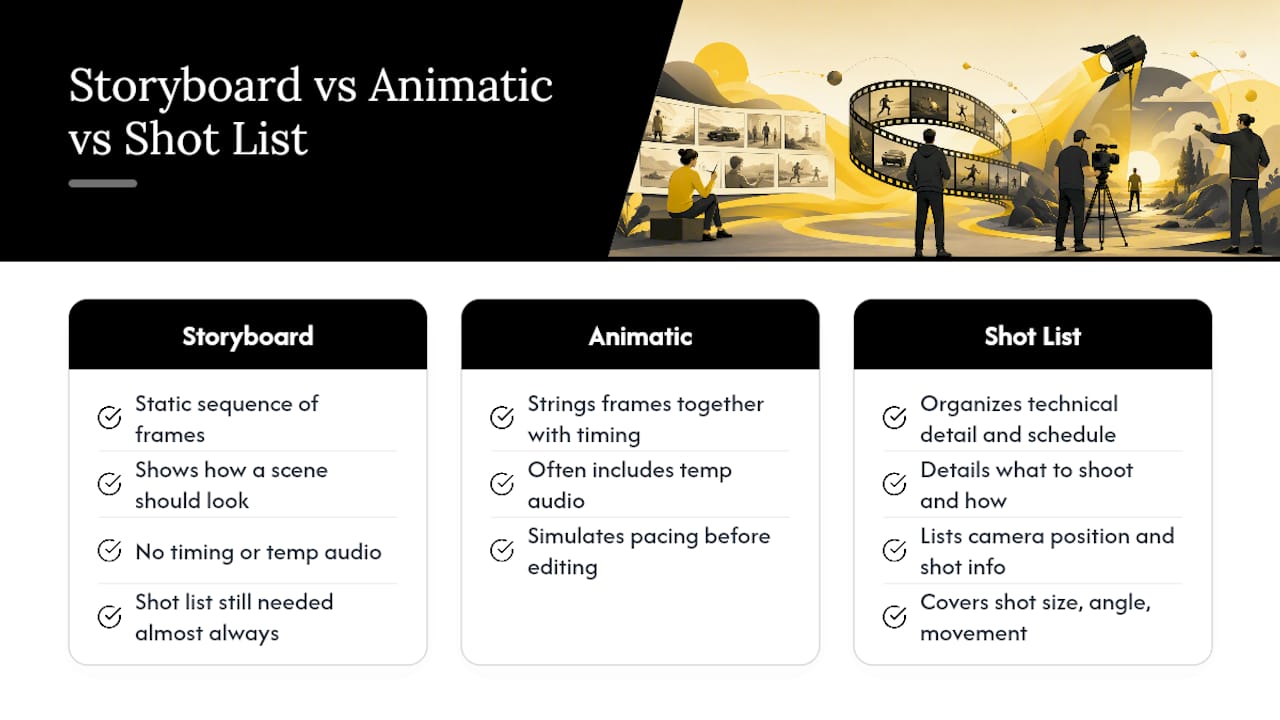
Is a storyboard the same as an animatic? No. A storyboard is a static sequence of frames, while an animatic strings those frames together with timing and often temp audio to simulate pacing before editing begins.
Do I need a shot list if I already have a storyboard? Almost always, yes. A storyboard shows how a scene should look; a shot list is what actually organizes the technical detail, camera position, and schedule your crew executes on the day.
What’s the difference between a shot list and a call sheet? A shot list details what to shoot and how; a call sheet tells cast and crew where to be and when. They work together but serve completely different functions.
Can a shot list replace a storyboard for a commercial? For a simple commercial, often yes. For one involving stunts, VFX, or heavy client approval, storyboarding the key sequences first prevents expensive surprises on set.
How detailed should a shot list be? Detailed enough that a 1st AD or camera operator never has to ask a clarifying question mid-setup, typically covering shot size, angle, movement, lens, and estimated time.
Sources
For deeper templates and examples, start with StudioBinder’s shot list breakdown for spreadsheet formats, No Film School’s pre-production guide for workflow sequencing, and Milanote’s video storyboard template for visual boards built from sketches or reference photos. Adapt these to your project rather than copying them verbatim; every crew’s coverage needs differ.
Recommended
Comments